
Xploree AI Keyboard Beta3.18.0 - Get APK
You'll be able to download in few seconds.
Publisher Description


Xploree beta provides you a chance to try the latest features before it gets released in the regular app. As a beta tester, your feedback is valuable on the latest features and also help us finding bugs/issues.
About Xploree:
Xploree is a smart keyboard that gives the users a smooth Multilingual Experience, Contextual GIFs & Stickers, Smart Themes, Emojis, Personalized Picture Stamps and other cool features.
Xploree Keyboard with its Artificial Intelligence adopts your way of typing and provides you smart suggestions (words, names, emojis) on the go.
With the Glide feature, now you can type faster with ease like a ninja. Also, you can dazzle your friends with Personalized Selfie Stickers, your own Cartoonized Photos and Personalized Picture Stamps.
Xploree Keyboard has a built in Smart Theme feature for Fitness where users can monitor their activities, set fitness goals and do more without using a dedicated fitness app.
You can also provide a makeover for your keyboard as per your mood and choose how your keyboard looks from a range of colourful Animated Themes.
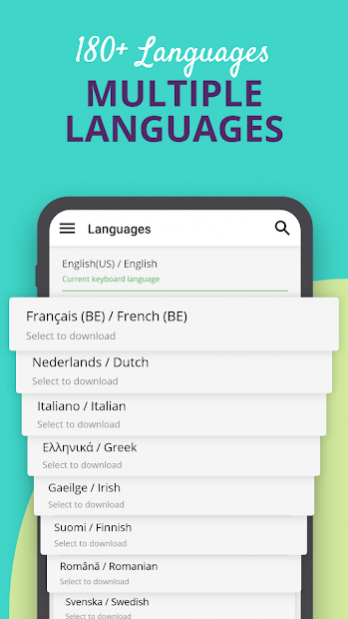
Xploree’s Multilingual Experience – You can easily type in more than 180 global languages including-
English
Spanish
German
Italian
Russian
French
Danish
Dutch
Hungarian
Norwegian
Portuguese
Swedish
Welsh and more.
Xploree with its faster word prediction, adapts to your unique vocabulary and provides faster predictions in more than 180 languages.
Xploree values and respects your privacy. We give priority to user convenience and privacy. To know more, check our privacy policy.
Learn more about Xploree on: www.xploree.com
Follow us on:
Facebook: http://www.facebook.com/Xploree
Twitter: http://twitter.com/XploreeMoments
About Xploree AI Keyboard Beta
The company that develops Xploree AI Keyboard Beta is KeyPoint Technologies. The latest version released by its developer is 3.18.0.
To install Xploree AI Keyboard Beta on your Android device, just click the green Continue To App button above to start the installation process. The app is listed on our website since 2022-06-07 and was downloaded 0 times. We have already checked if the download link is safe, however for your own protection we recommend that you scan the downloaded app with your antivirus. Your antivirus may detect the Xploree AI Keyboard Beta as malware as malware if the download link to com.kpt.xploree.app.ce is broken.
How to install Xploree AI Keyboard Beta on your Android device:
- Click on the Continue To App button on our website. This will redirect you to Google Play.
- Once the Xploree AI Keyboard Beta is shown in the Google Play listing of your Android device, you can start its download and installation. Tap on the Install button located below the search bar and to the right of the app icon.
- A pop-up window with the permissions required by Xploree AI Keyboard Beta will be shown. Click on Accept to continue the process.
- Xploree AI Keyboard Beta will be downloaded onto your device, displaying a progress. Once the download completes, the installation will start and you'll get a notification after the installation is finished.
Program Details
System requirements
Download information
Pricing
Version History
version V3.18.0_CE
posted on 2022-06-07
1. Trending GIFS from KULFY
2. Redesign of Shortcut Bar Icons
3. Bug Fixes to Improve Performance
version V3.17.0_CE
posted on 2022-03-09
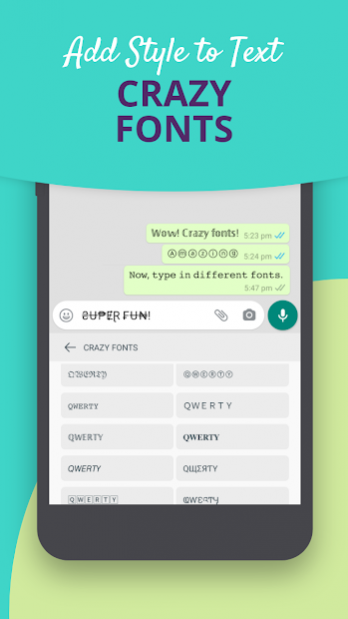
1. Now choose your favorite QWERTY font from settings.
2. Now seamlessly access discoveries through the presto icon on home screen.
3. Number row appears automatically when feeding passwords without changing the settings.
4. Emoji Prediction now shows emojis based on your preferred skin tone.
5. Explore wide variety of content on the Xploree app from Youtube and Newspoint.
6. Now enjoy an incredible line up of games on Xploree courtesy Viyu Games.
version V3.14.1_CE
posted on 2021-07-08
1)Check out the new pixtures feature!
2)Enjoy the new custom fonts
3)Try the new real time Translation feature
version V3.1.4_CE
posted on 2019-08-06
1. Cricket, ball by ball updates, the man of the match and match results on your keyboard
2. Notifications for live score updates
3. Emoji predictions available as a default feature
4. Stamp your identity on your photos creating unique postcards to share on social
5. Customize keyboard height for the ease of typing
6. Now access discoveries through the presto icon on the home screen
7. Number row appears automatically when feeding passwords without changing the settings
Disclaimer
External Download
We do not host Xploree AI Keyboard Beta on our servers. We did not scan it for viruses, adware, spyware or other type of malware. This app is hosted by Galad and passed their terms and conditions to be listed there. We recommend caution when installing it.
The APK Download link for Xploree AI Keyboard Beta is provided to you by apps112.com without any warranties, representations or guarantees of any kind, so access it at your own risk.
If you have questions regarding this particular app contact the publisher directly. For questions about the functionalities of apps112.com contact us.
